How to Use Taxpayer Profile Inquiry Online FBR for NTN Verification via CNIC Number
The Taxpayer Profile Inquiry facility available at FBR online services portal (FBR Iris) allows individuals and businesses to verify their National Tax Number (NTN) and taxpayer registration details online. Through this Federal Board of Revenue (FBR) portal, taxpayers can easily check their tax profile, registration status, and NTN information using a CNIC number.
This online verification facility of FBR helps taxpayers, employers, banks, financial institutions, and businesses to confirm taxpayers registration details without visiting an FBR office.
Benefits of Taxpayer Profile Inquiry?
Taxpayer Profile Inquiry has many benefits for:
Individual Taxpayers
- To Verify NTN registration status.
- Confirm tax details associated to CNIC.
- Check taxpayer information before registration / filing tax returns.
Businesses
- Verify vendors and suppliers tax registration status
- To Confirm customer tax registration status.
- Check suppliers status with FBR before making payments
Banks and Financial Institutions
- To confirm NTN details of clients
- Verify taxpayer registration status for account opening and financing purposes by banks
How to Verify NTN Online via CNIC Number
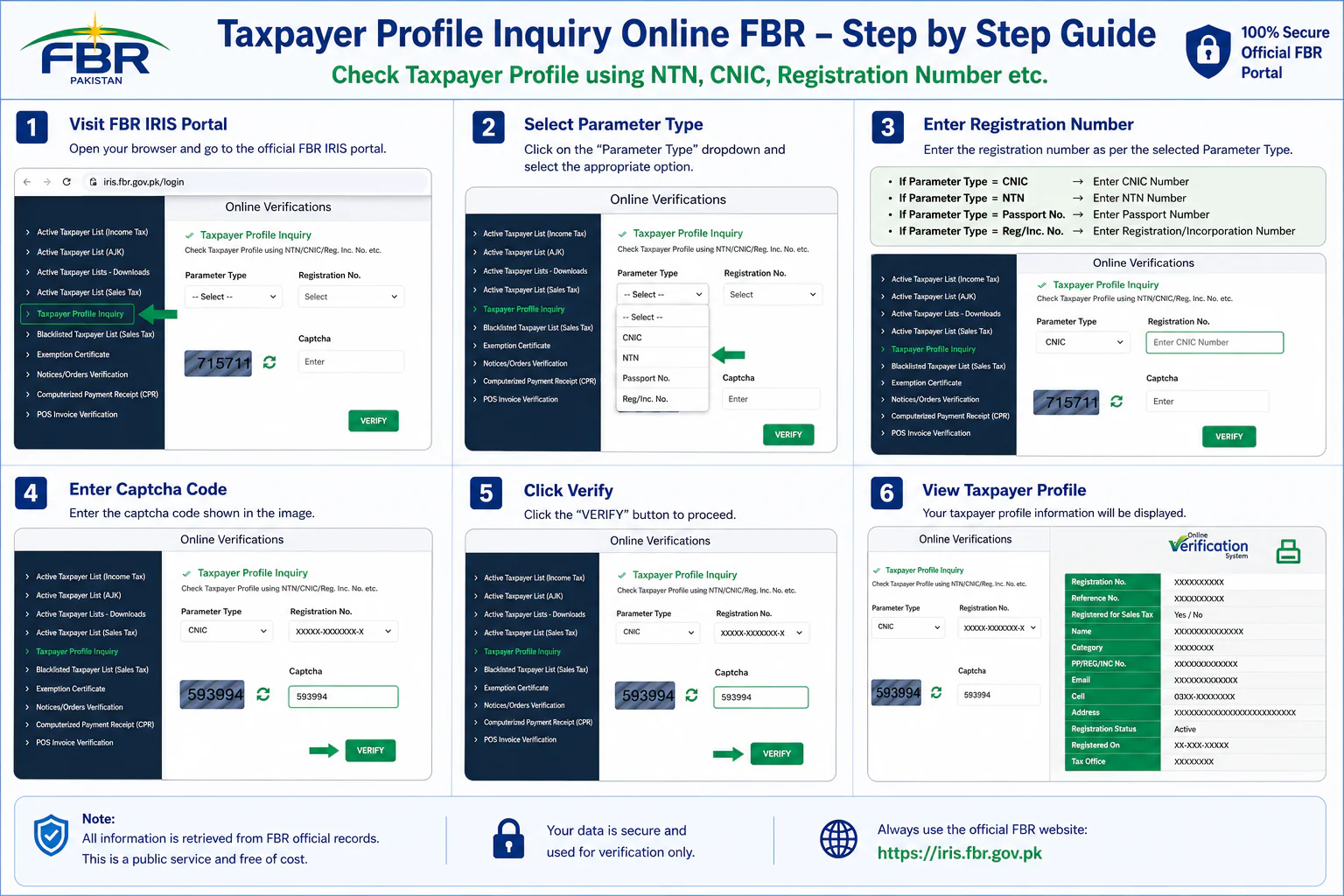
Follow these steps to verify taxpayer profile inquiry online via CNIC:
Step 1: Visit the FBR Portal
Open the official FBR portal https://iris.fbr.gov.pk
Step 2: Click on the “Taxpayer Profile Inquiry”
At FBR portal there is “online verification services” portion, click there “taxpayer profile inquiry” tab.
Step 3: Select Search Criteria
Choose one of the available search options as search criteria.
- CNIC Number
- NTN Number
- Registration Number
- Passport No
Step 4: If you Select CNIC, then enter CNIC Number
Type your 13-digit CNIC number without dashes at registration tab
Step 5: Enter Captcha
Enter the security code (captcha) displayed on the screen
Step 6: Click Verify
Press the verify button to get taxpayer information.
Step 7: View Results
The system will display the available taxpayer details linked with the CNIC number.
Information Displayed in Taxpayer Profile Inquiry
Following information / details will be available when your get the result of taxpayer profile inquiry:
- Registration Number
- Reference Number
- Registered for Sales Tax
- Name
- Category
- Passport no/Registration no/Incorporation no
- Cell
- Address
- Registered on
- Tax Office
- Regsirtation status
- Business / branch name, business address, and business activities
Frequently Asked Questions (FAQs)
Answer: You can check your online NTN verification by CNIC very easily through visiting FBR Iris Portal by giving details of CNIC at “taxpayer profile inquiry” tab.
Answer: Yes in Pakistan 13 digit CNIC no is now your National Tax Number (NTN No.). However if you need your specific 7 digit NTN no for some official purposes then check your taxpayer profile inquiry and in the result “Reference No” is your NTN No.
Answer: if you need your specific 7 digit NTN no for some official purposes then check your taxpayer profile inquiry and in the result “Reference No” is your NTN No.
Answer: First of all you have to register yourself with FBR and then file your tax return and pay penalty if applicable.
TAGS
Check ATL Status | Active Taxpayer List | NTN Verification Online | NTN Registration Pakistan | Income Tax Return Filing | Iris Login Guide | FBR Maloomat Portal | FBR Tax Calculator | Salary Tax Calculator Pakistan | Tax Rates Pakistan | FBR Registration Guide | Wealth Statement Guide | Online NTN Registration | FBR Online Verification | Tax Return Due Date | FBR Helpline | Taxpayer Registration Status | Tax Filing Benefits | FBR Iris Portal | CNIC Verification Online