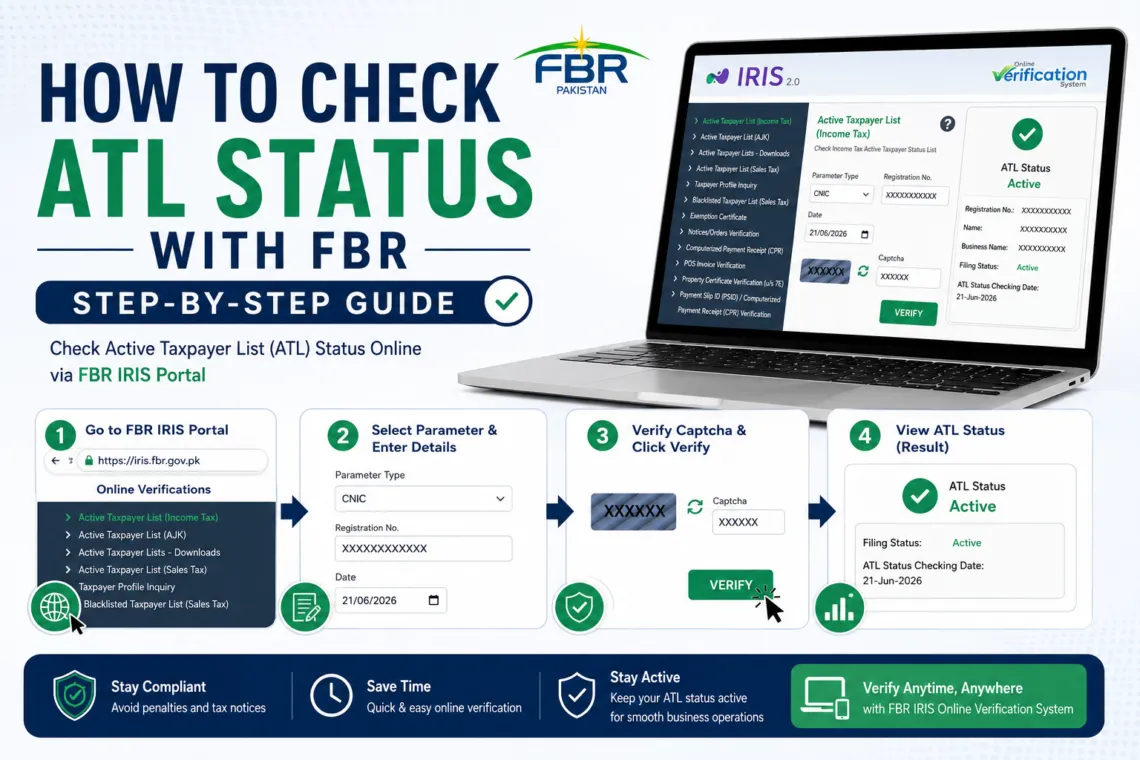
How to Check ATL Status Online Through FBR IRIS Portal
Sometime you check that bank deducts tax on your some transactions, or a car dealer invoiced you with a higher tax rate as compare to one of your friend, the matter is very clear that it is due to the reason that your name is not on the FBR’s Active Taxpayer List, which is known as the ATL status.
There are methods which you can use to check your FBR active taxpayer status online before doing any transaction in the bank or transferring any asset in your name.
What Is the FBR Active Taxpayer List (ATL)?
The Active Taxpayer List is issued by the Federal Board of Revenue. It consists the data of all individuals and businesses who have filed their income tax return for the relevant tax year on time.
If your name exists on this list, you’re then a filer. If it doesn’t, you’re then a non-filer. Even if you’ve filed your tax return in the past and missed the tax returns of onward years.
In Pakistan, filers and non filers are taxed differently, the tax rates of non filers are higher than the filer taxpayers.
Difference Between Filer, Non Filer and Late Filer
As explained above that when a person files his tax returns regularly then he is filer, if does not file or skip any of the tax return then he will be termed as non filer and if files his tax return after due date then his status will be “late filer”.
Late filer will become active filer if he files his next tax return with in due date.
What are the Benefits of filer status?
When you file your tax return on time then you enjoys status of active tax filer in many ways like reduced tax rates on many transactions as given below:
- Withholding tax on bank transactions like cash withdrawals above Rs 50,000 a day under section 231AB is not applicable to taxpayers having filer status with FBR.
- Tax on Profit on savings on bank deposits under section 151 is double if investor is non filer.
- Tax on buying or registering a vehicle under section 231B and 234 are higher if buyer is non filer.
- Tax on property purchase and registration under section 236K are higher for a person if he is not on the active taxpayer list.
- Tax on sale of property under section 236C is higher if person is non filer.
- Tax deducted on dividends under section 150 is double if person is non filer.
- Tax on prize money under section 156 is also double.
- Tax rates applied on particular business payments like on supplies, services, and freight under section 153 are also double if receiver of payments is non filer with FBR.
How to Check ATL Status with FBR?
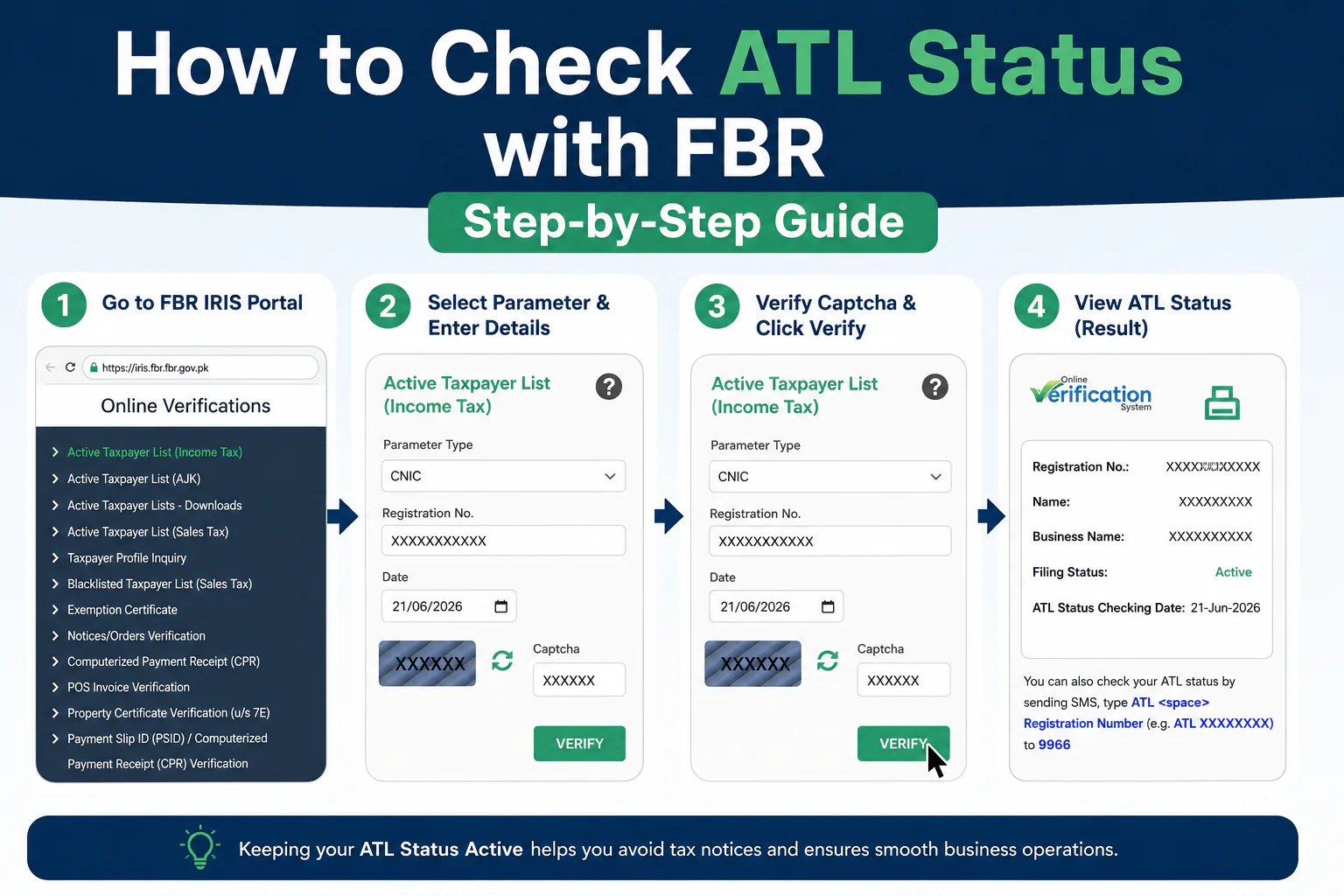
Method 1: Check ATL Status on the FBR Website
This is one of the way to check your status.
- Go to the official FBR Online Verification Portal at https://iris.fbr.gov.pk/ and select “Active Taxpayer List Income Tax” from the Online verifications menu.
- Choose “ATL (Income Tax)” if you want to check your individual filer status, or “ATL (Sales Tax)” if you’re checking a business’s sales tax filer status.
- Select your ID type — CNIC for individuals, or NTN for companies and registered businesses.
- Enter your 13-digit CNIC number without dashes.
- Enter the date of filer status you are cehcking for
- Enter the captcha/security code shown on screen and press “verify” button.
- The result will show your Registration No, Name, Business Name, Filing Status, and filing status checking date
Method 2: Check ATL Status via SMS
FBR also offers an SMS-based verification service.
- Open your phone’s messaging app.
- Type ATL, leave a space, then enter your 13-digit CNIC number without dashes (for example: ATL 3520112345671).
- Send the message to 9966.
- You’ll receive a reply confirming whether your CNIC is currently on the Active Taxpayer List or not.
How Often Does FBR Update the ATL?
When you file the tax return within due date then FBR ATL status will be updated on filing tax return. However, if tax return is submitted after due date then after submission of return you have to prepare the penalty challan and deposit it in the bank. ATL status with FBR will become active after few hours of payment of penalty surcharge.
Frequently Asked Questions
Answer: Yes. The FBR verification portal and SMS service only require a CNIC or NTN number — they don’t require login and passwords — so you can check the status of any CNIC.
Answer: Yes. Filing your return even after the original deadline, may add you in FBR ATL status after payment of penalty surcharge.
Answer: Yes, if you are an individual, your 13-digitCNIC is as your NTN. However, if you need your NTN number then open your taxpayer profile inquiry and here reference number is your ntn no.
Answer: You can check the ATL status by visiting FBR website https://iris.fbr.gov.pk/ and entering CNIC there at online verification services.
Answer: Yes you can check the ALT status with your CNIC number by using SMS method or visiting FBR website.
Answer: You can become active taxpayer by filing tax return of the latest tax year. If submitting after due date then penalty is also required to deposit after submission of tax return.
What is the ATL SMS code?Answer: For individuals, Type ATL (Space) 13 digit CNIC number (without dashes) and send it at 9966.
TAGS
Salary Tax Calculator Pakistan | NTN Registration Guide | How to File Income Tax Return | ATL vs Non-ATL Tax Rates | FBR Tax Slabs Pakistan | FBR IRIS Registration Guide | Taxpayer Profile Inquiry Guide | Withholding Tax Rates in Pakistan | How to Become a Filer | FBR Online Verification Services