Online NTN Verification by CNIC – Check NTN Number with FBR
Quick answer
To verify an NTN online by CNIC:
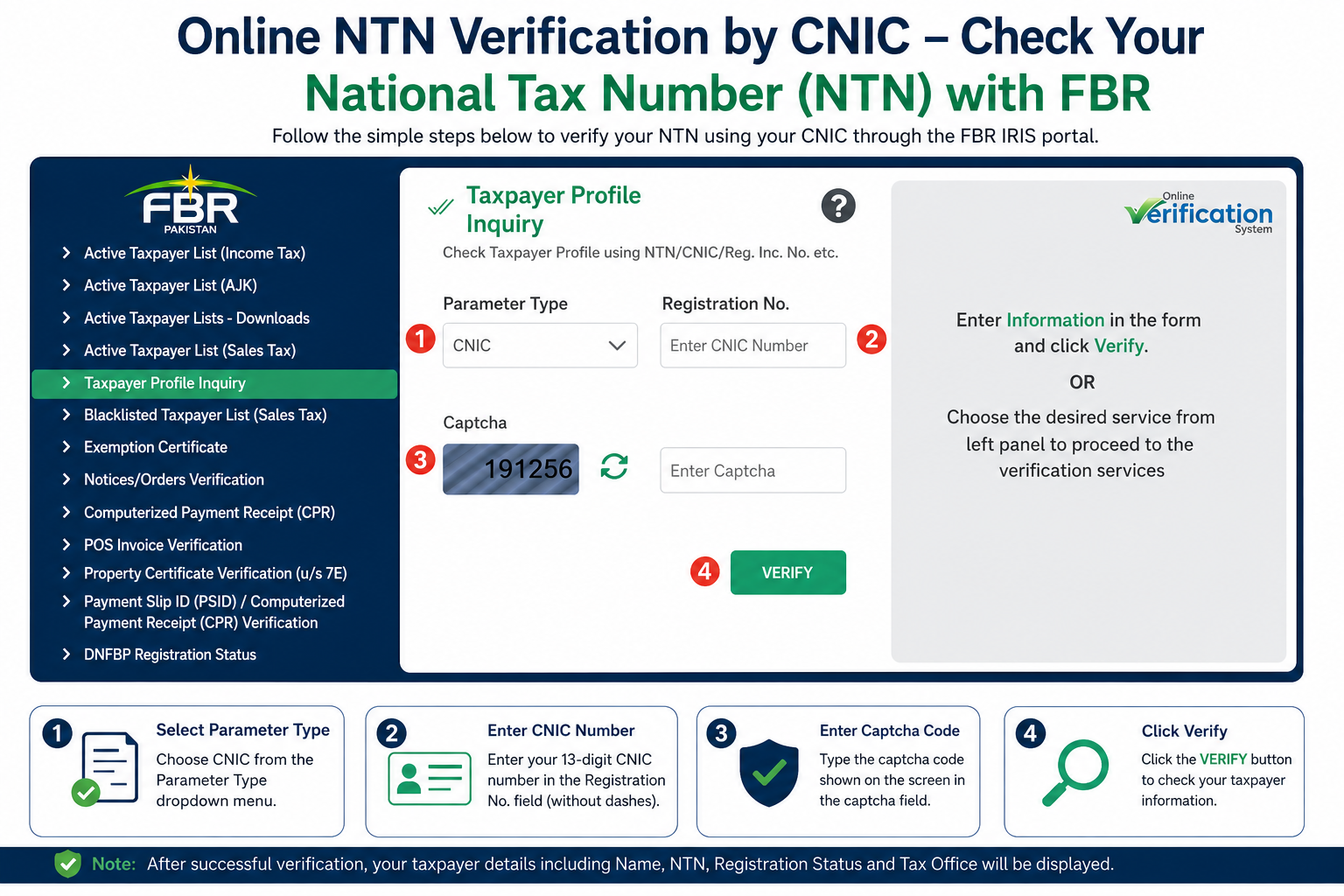
- Open the FBR portal at iris.fbr.gov.pk and click Taxpayer Profile Inquiry.
- Choose CNIC as the parameter type and enter your 13-digit CNIC.
- Enter the captcha and click Verify. Your registration details appear on screen.
For individuals, your 13-digit CNIC works as your NTN. The 7-digit number on the result is your Reference No., the old-style NTN.
CNIC formatter and FBR shortcut
Type your CNIC, check the format, then jump to the FBR portal with the number ready to paste.
This tool runs in your browser. Your CNIC is not sent to or saved by this website. The actual verification happens on FBR’s own portal.
What is an NTN, and is it the same as your CNIC?
The National Tax Number (NTN) identifies a taxpayer in the Federal Board of Revenue (FBR) system. For individuals, FBR uses the 13-digit CNIC as the NTN, so you no longer need to remember a separate number for most purposes.
The older 7-digit NTN still shows up in the system as the Reference No. You may be asked for it by banks, foreign platforms, or clients who still use the old format. Freelancers receiving payments from abroad often need it.
Companies and Associations of Persons (AOPs) are registered under their own registration numbers and receive a separate NTN.
How to do online NTN verification by CNIC, step by step
- Go to the FBR Taxpayer Profile Inquiry page through iris.fbr.gov.pk.
- Click Taxpayer Profile Inquiry in the left menu.
- Under Parameter Type, select CNIC. Other options include NTN, Passport No and Reg/Inc No.
- Enter your CNIC in the registration number field, without dashes unless the form asks for them.
- Type the captcha exactly as shown.
- Click Verify.
- Read the result, then save or print the page for your records.
What the verification result shows
If the CNIC is registered, the result page typically shows:
- Taxpayer name and registration status
- Reference No. (the 7-digit NTN)
- Tax office or jurisdiction information
- Business details and address, where recorded
- Contact details held by FBR, such as mobile number and email
Check that the name, address and contact details are correct. Wrong details can cause missed notices and mismatches when you file your return.
Other ways to check your NTN
If the online portal is slow or the captcha keeps failing, there are fallback options:
- SMS: FBR runs an SMS-based service. Send your CNIC to 9966 by adding ATL at start, (the reply from FBR confirms whether you are currently on the Active Taxpayer List.)
- FBR helpline: Call 051-111-772-772 with your CNIC ready.
-
Telephone line for Females: +92 51 9107025 - (Monday to Friday - 8:00 am to 4:00 pm)
-
Email: helpline@fbr.gov.pk
- A tax professional: We can verify your registration and filer status for you. See the contact options below.
NTN verification problems and how to fix them
| What you see | Likely cause | What to do |
|---|---|---|
| No record found | CNIC is not registered with FBR, or a digit is wrong | Re-check all 13 digits. If correct, register for an NTN through FBR’s IRIS system. |
| Wrong or empty result | Wrong Parameter Type selected | Select CNIC for a CNIC search, NTN only for a 7-digit number. |
| Captcha error | Typed incorrectly or the code expired | Refresh the captcha and type it again, paying attention to upper and lower case. |
| Portal does not load or times out | Heavy traffic, often near filing deadlines | Try again early morning or late evening, use another browser, or use the SMS or helpline option. |
| Name or details are wrong | Old or mismatched record | Update your profile in IRIS, or ask a tax consultant to correct it. |
| Registered, but not in the Active Taxpayer List | Return not filed or filed late for the year | File the return. See our Active Taxpayer List (ATL) check guide. |
Registered is not the same as active. Having an NTN means you are in FBR’s system. Active Taxpayer List status depends on filing your return on time, and it affects withholding tax rates on banking, property and vehicles.
Who should verify an NTN?
- Salaried individuals to check that registration and details are correct before filing.
- Business owners and sole proprietors to confirm their registration.
- Freelancers who need the 7-digit reference number for foreign platforms and payments.
- Companies and accountants verifying a supplier’s, customer’s or employee’s taxpayer status.
- Anyone opening a business bank account or applying for government contracts.
Types of NTN
- Individual NTN: Issued on a person’s CNIC to salaried individuals and business individuals.
- AOP or partnership NTN: For associations of persons, with at least two partners, linked to the partnership’s registration documents.
- Company NTN: For companies, linked to incorporation with SECP.
Why NTN registration matters
- You can file income tax returns and become an active taxpayer.
- Lower withholding tax rates on banking, property and vehicle transactions for Active Taxpayer List members.
- Eligibility for government contracts.
- Legal compliance.
Related guides
- How to check Active Taxpayer List (ATL) status
- How to register for an NTN with FBR
- Salary Tax Calculator 2026-27
- Filer vs non-filer: what changes
Need help with your NTN or tax return?
Global Tax Consultants handles NTN registration, income tax return filing, ATL status issues and FBR matters for individuals and businesses across Pakistan.
Frequently asked questions
Is my CNIC my NTN?
For individuals, yes. FBR uses your 13-digit CNIC as your National Tax Number. The 7-digit number shown as Reference No. in the verification result is the older NTN format.
How do I find my 7-digit NTN?
Run Taxpayer Profile Inquiry with your CNIC. The Reference No. on the result page is your 7-digit NTN.
Is NTN verification free?
Yes, checking your registration on FBR’s portal does not cost anything. Be careful of websites or agents that charge for a simple lookup.
Can I verify someone else’s NTN?
The inquiry can be run for another taxpayer using their CNIC, NTN, passport number or registration number. Businesses commonly do this to check suppliers. Use it only for legitimate purposes.
Can I verify a company or AOP NTN?
Yes. Choose the matching parameter type, such as NTN or Reg/Inc No, and enter the number.
How long does NTN registration take?
Individuals can usually register online through FBR’s IRIS system in one session. For partnerships and private limited companies, the NTN is generally issued once registration with the relevant registrar or SECP is complete. Timing varies, so check FBR’s current process.
What is the return filing deadline for NTN holders?
For individuals the due date is generally 30 September each year, unless FBR extends it. Companies’ deadlines depend on their financial year-end. Always check the latest FBR notification.
What is the difference between NTN and STRN?
The NTN is the income tax identifier. The Sales Tax Registration Number (STRN) is issued for sales tax purposes to registered businesses.
This guide is for general information. FBR portals, menus and procedures change, so confirm the current process on the official FBR website. For advice on your own situation, speak to a qualified tax professional.