How to Check No of SIMs through PTA SIM Information System
How to Check No of SIMs through PTA SIM Information System. If you want to know the exact number of SIMs registered against your CNIC by visiting the PTA website then follow…

How to Check No of SIMs through PTA SIM Information System
How to Check No of SIMs through PTA SIM Information System. If you want to know the exact number of SIMs registered against your CNIC by visiting the PTA website then follow the step-by-step process given below:
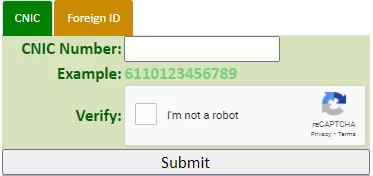
PTA SIM Information Website:
- Open this Link, PTA Website
- There will be link for PTA SIM Information System, open it cnic.sims.pk
- Once you visit the PTA SIM Information website, you’ll see the above screen.
- The next step is to enter your CNIC number in the given field.
- then after submitting you’ll get your result in table
- The table will show you the number of active sims telecom operator wise
PTA SIM Information Check through SMS
If you want to know the exact number of SIMs registered against your CNIC through your ID card number then here’s the few steps:
- Open the text message option on your mobile phone
- Type in your CNIC without dashes
- then Send your text message to 668
- It will give you the number of active SIMs against your CNIC along with their operator names.


